
Standard ePoE access is available at KES 0 to the institution under the trainee-paid model.
NOV/DEC 2026 ASSESSMENT REGISTRATION IS OPEN
•
Complete registration by Friday, 2 October 2026
Run Digital PoE Readiness Without Buying Another Heavy Platform.
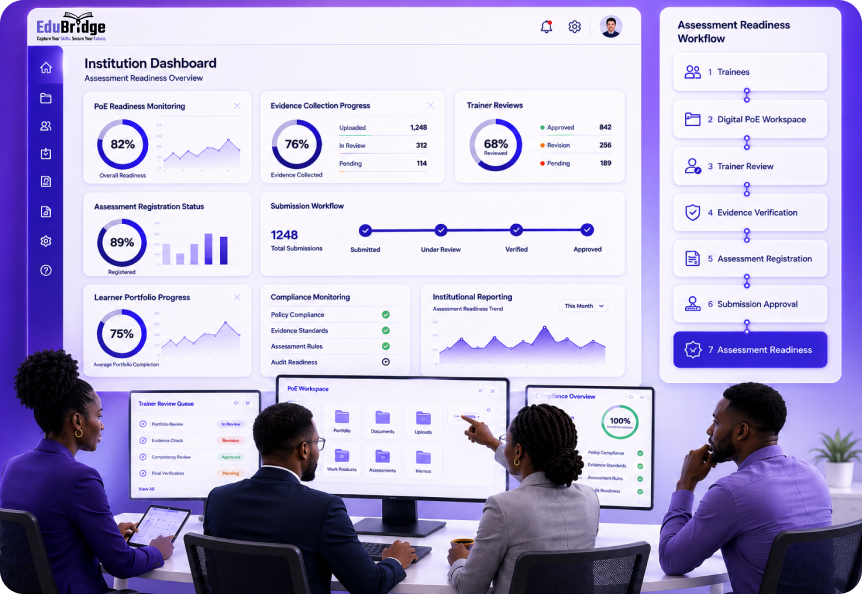
EduBridge helps institutions move away from box files, scattered evidence and last-minute assessment pressure by giving trainees a digital PoE workspace while institutions monitor readiness, trainer review, assessment registration and submission workflows.
Built for TVET CDACC-assessed programmes, QAB-assessed programmes, and CBET Master-powered assessment workflows.
Activate Institution Workspace
For TVET CDACC Assessment Centers.
Request Institution Demo
For QAB/QAI, CBET Master setup or
guided onboarding.
guided onboarding.
Manual PoE Management Is Slowing Everyone Down.
Most institutions are still managing PoEs through paper files, printed photos, WhatsApp evidence, manual trainer signatures, spreadsheets and physical follow-ups.
That creates pressure for everyone:
-
 Trainees rush to organize evidence near assessment,
-
Trainers spend too much time checking paper files,
-
HODs struggle to know which trainees are ready,
-
Registrars lack real-time visibility,
-
Assessment offices chase incomplete records,
-
And management only sees the problem when deadlines are close.
One Readiness Layer for PoE, Review, Registration and Reporting.
EduBridge gives your institution a digital readiness layer for managing trainee PoEs, trainer review, assessment registration and institutional reporting.
Trainees subscribe to their personal PoE workspace. Your institution gets the tools needed to monitor, support and verify readiness without paying for a heavy platform upfront.

Institution Dashboard
Monitor trainee activation, PoE progress, subscription status, pending reviews and readiness gaps.

Trainer and Assessor Access
Trainers review submitted evidence, give feedback and guide corrections before it is too late.

PoE Readiness Tracking
Identify trainees with missing, weak or incomplete PoEs early enough for intervention.

Assessment Registration
Allow trainees to select assessment series and eligible units where enabled by the institution.

Approval Workflows
Support trainer, HOD, finance and registrar review before final submission.

Reports and Audit Trail
Track actions, approvals, readiness, submissions and compliance records.
What Your Institution Gets Under the Trainee-Paid Model.
When trainees subscribe individually, your institution receives standard EduBridge ePoE access at no baseline platform cost.

Institution Workspace
A central portal for monitoring trainee PoE activity, readiness and institutional progress.

Trainer and Assessor Accounts
Enable trainers and assessors to review evidence, comment, return for correction and support trainees.

PoE Readiness Dashboards
Track who has activated, who has subscribed, who has uploaded evidence and who is at risk.

Document Uploads
Attach assessment-related documents such as attendance records, mark sheets and supporting files where applicable.

Assessment Pathway Support
Support TVET CDACC-assessed programmes and QAB/CBET Master workflows based on programme setup.

Reports and Monitoring
Generate reports on activation, subscription, evidence upload, review progress and readiness.
Why the Trainee Subscription Model Works.
The PoE belongs to the trainee.
It is their record of practical work, evidence, skills and readiness. EduBridge gives each trainee a personal digital workspace that can stay useful beyond one assessment cycle.
The institution supports the process, but the trainee owns the portfolio.

The Evidence Belongs to the Trainee
Photos, videos, documents and practical evidence are the trainee’s skills record.
The PoE Can Outlive the Assessment
A digital PoE can continue serving as proof of skills after certification.
The Institution Avoids Heavy Platform Cost
The institution does not need to purchase a large system just to start ePoE readiness.
Adoption Scales Naturally
As more trainees subscribe, the institution gains better readiness visibility.
Sponsored Models Remain Possible
Institutions may request a sponsored arrangement if they prefer to pay on behalf of trainees.
From Trainee Activation to
Assessment Readiness.

STEP 1
Institution Activates Workspace
The institution activates its EduBridge workspace and confirms official contacts.
STEP 2
Focal Person Is Appointed
A senior institution contact coordinates trainee activation, trainer onboarding and readiness follow-up.
STEP 3
Trainees Activate Profiles
Trainees use EduBridge to find their profile, check assessment units and create their login.
STEP 4
Trainees Subscribe and Upload Evidence
Trainees choose a plan, unlock PoE upload and start adding photos, videos and documents.
STEP 5
Trainers Review and Guide
Trainers review evidence, give feedback and help trainees correct gaps early.
STEP 6
Institution Tracks Readiness
The institution monitors who is ready, who is pending and who needs support.
STEP 7
PoE Follows the Assessment Pathway
PoEs follow the right pathway based on whether the programme is TVET CDACC-assessed or QAB-assessed through CBET Master.

Assessment Registration Is the Next Big Shift.
EduBridge is being expanded to help institutions digitize assessment registration and unit approval.
Many institutions still use manual forms for exam registration, re-assessment, missed exams and summative assessment.
EduBridge Assessment Registration will allow trainees to select an open assessment series, choose eligible units and submit their registration digitally for approval.
What This Will Replace
Paper assessment registration forms
Manual unit selection
Trainer signatures on forms
HOD approvals on paper
Finance clearance stamps
Registrar approval queues
Spreadsheet-based registration tracking
Repeated unit-code errors
How It Will Work
Trainee Selects Assessment Series
Only open assessment series will be shown.
EduBridge Shows Eligible Units
The trainee selects from mapped units instead of typing unit codes manually.
Trainer Reviews Unit Selection
The trainer confirms the selected units are academically correct.
HOD Reviews Programme Correctness
The department confirms programme, level, cycle and unit accuracy.
Finance Clears Payment Policy
Where enabled, finance reviews payment, ERP status or fee policy.
Registrar Gives Final Approval
Approved registrations are submitted to the correct assessment destination.
EduBridge Routes Correctly
TVET CDACC-assessed programmes route to TVET CDACC workflows. QAB-assessed programmes route through CBET Master where configured.
For TVET CDACC Assessment Centers.
TVET CDACC Assessment Centers can activate their EduBridge institution workspace and begin supporting trainee activation and ePoE readiness.
EduBridge helps CDACC-assessed programmes move from manual PoE preparation to structured digital evidence upload, trainer review, readiness tracking and submission support.
What CDACC Centers Can Do

Activate institution workspace
Confirm institution profile
Add focal person
Add trainers and assessors
Review synced trainees
Monitor trainee activations
Track PoE subscription status
Review evidence readiness
Support trainees before assessment pressure starts
For TVET CDACC Assessment Centers.
For QABs and QAIs:
EduBridge + CBET Master
For institutions assessing programmes as QABs or QAIs, EduBridge works with CBET Master
to support assessment workflows, candidate registration, assessor review, verification,
moderation, reporting and certification support.
This setup requires guided onboarding because it involves assessment ownership,
programme configuration, users, roles, workflows and reporting rules.
What QABs Get


EduBridge
for ePoE
for ePoE
Trainees upload PoE evidence digitally and organize it under the correct units.

CBET Master for
Assessment Workflows
Assessment Workflows
Assessors, verifiers and authorized users manage review, grading,
verification and reporting.

Guided Setup
EduBridge and CBET Master are configured with your programmes,
roles and workflows.

Reporting and
Traceability
Traceability
Dashboards and audit trails support transparency and institutional oversight.
Before EduBridge vs With EduBridge.
| Area | Before EduBridge | With EduBridge |
|---|---|---|
| PoE Management | Box files, paper, scattered files | Digital PoE organized by unit |
| Trainer Review | Manual, delayed, hard to track | Online review and comments |
| Readiness Tracking | Limited visibility | Dashboard-based readiness tracking |
| Assessment Registration | Forms, signatures, stamps | Digital unit selection and approval workflow |
| HOD / Registrar Visibility | Manual follow-up | Real-time queues and reports |
| Evidence Safety | Easy to lose or damage | Stored in trainee digital workspace |
| Reporting | Spreadsheets and manual summaries | Institution dashboards and exports |
| Cost | Heavy platform or manual costs | Standard ePoE access at KES 0 under trainee-paid model |
Why Institutions Should Not Wait.
Digital PoE readiness is not something to start when assessment is already near.
By then, trainers are overwhelmed, trainees are rushing, evidence is incomplete and management has limited time to intervene.
What QABs Get


Trainees Need Time
Evidence should be uploaded as learning happens, not during assessment week.

Trainers Need Visibility
Trainers need time to review, comment and guide corrections.

Departments Need Reports
HODs should know which programmes are ready and which ones need intervention.

Registrars Need Control
Assessment offices need clean, trackable records before deadlines arrive.

QABs Need Structured Workflows
QAB programmes require more than file upload. They need role-based assessment workflows.

Assessment Registration Is Coming
Institutions that activate early will be better positioned to digitize unit registration and approval.
Every Successful Rollout Needs a Strong
Institution Focal Person.
EduBridge works best when each institution appoints a senior focal person to
coordinate activation, communication, trainer onboarding and trainee follow-up.
Recommended Focal Person
The institution may appoint:
-
 Deputy Principal Academic
-
Registrar
-
Assessment Coordinator
-
CBET Coordinator
-
Director of Training
-
Academic Affairs Officer
-
Any senior officer designated by management
What the Focal Person Helps With
-
Coordinate workspace setup
-
Share official activation communication
-
Support trainee activation
-
Coordinate trainers and assessors
-
Monitor readiness reports
-
Escalate blockers
-
Support ambassador or class representative communication
See Readiness Before It Becomes a Crisis.
EduBridge gives institution teams visibility across activation, subscription,
upload progress, trainer review and readiness gaps.
Trainees synced
Trainees activated
Trainees subscribed
PoE uploads started
Units with no evidence
Evidence pending trainer review
Returned evidence
Ready for assessment
Pending assessment registration
Failed submissions or exceptions
👉 What you can see early, you can fix early.
Optional Add-Ons for Institutions
That Need More.
Standard ePoE access is available under the trainee-paid model. Institutions that want
additional modules can request paid institutional solutions.
Optional Modules

Industry Training /
Attachment
Attachment
Digital logbooks, attendance tracking, supervisor feedback and institution reports.

Teaching Practice
Digital records, supervisor review, school placement monitoring and reporting.

Custom Workflows
Institution-specific approvals, reports, integrations or dashboards.

Sponsored Trainee
Subscriptions
Subscriptions
Institutions may request to pay for trainees directly under a sponsored arrangement.

Built by a Team That Understands Kenya’s Education Systems.
EduBridge is built by ABNO Softwares, a long-standing education technology provider behind major education platforms used by institutions across Kenya.
EduBridge is designed around Kenya’s CBET environment, digital PoE readiness, TVET CDACC workflows and QAB/CBET Master assessment pathways.
What CDACC Centers Can Do
Built for Kenya’s CBET and PoE environment
Supports TVET CDACC and QAB pathways
Works alongside ABNO Unisol, Intellimis or standalone institution systems
Supports mobile-first trainee activation
Designed for trainer, HOD, registrar and management visibility
Built to reduce paperwork and improve assessment readiness
Questions Institutions Ask Before Activating EduBridge
No. Under the standard model, trainees subscribe individually and the institution gets access to the standard ePoE workspace, dashboards, trainer access and readiness tools.
The PoE belongs to the trainee. EduBridge gives each trainee a personal digital evidence workspace they can keep beyond one assessment cycle.
Yes. Institutions may request a sponsored arrangement if they prefer to pay for trainees directly.
No. EduBridge supports TVET CDACC-assessed programmes and QAB-assessed programmes through CBET Master where configured.
No. QAB/QAI onboarding requires guided setup because CBET Master assessment workflows, roles and programme configurations must be aligned first.
It helps institutions monitor trainee activation, PoE uploads, trainer reviews, readiness gaps, assessment registration and reports.
Yes. Trainers and assessors can review submitted evidence, give feedback and support correction where enabled.
Yes. EduBridge Assessment Registration is being built to allow trainees to select assessment series and eligible units, then submit for institutional approval.
No. EduBridge is not replacing your ERP. It can work independently or alongside systems such as ABNO Unisol or Intellimis.
EduBridge can still work as a standalone PoE and readiness platform.
No. Paid institutional modules such as Industry Training, Teaching Practice, custom workflows or sponsored subscriptions are optional.
TVET CDACC Assessment Centers can begin activation through the institution workspace flow. QAB/QAI institutions should request guided onboarding.

Start Before Assessment Pressure Builds.
Activate EduBridge now so your trainees, trainers, departments and assessment
office can move from manual PoE pressure to digital readiness.
Activate Institution Workspace
For TVET CDACC Assessment Centers.
Request Institution Demo
For QAB/QAI, CBET Master setup
or guided onboarding.
or guided onboarding.
QAI/QAB?
Request EduBridge + CBET Master Onboarding

Already Used by Leading Institutions
EduBridge is trusted by institutions running CBET, Teaching Practice and Industry Training across Kenya.
If your institution is already on EduBridge,
don’t be the one left behind.
Still Unsure?
Ask yourself: > What happens if my PoE is rejected?
If that risk worries you, EduBridge is for you.
Partners
Support trainee activation as a student
ambassador, campus partner or field partner.



Kaka House, 3rd Floor, Maua Close off Parklands Road, Westlands, Nairobi, Kenya

